If you fly ArduPilot on a Windows laptop and want every setup page and a simulator built in, Mission Planner is the safer choice. If you're on a Mac or an Android tablet, or your team flies PX4 as well, QGroundControl is. Both are free, open source and actively maintained, and QGroundControl 5.1 closed several of the ArduPilot gaps people still quote in forum threads. UXDuck is a third option for ArduPilot. It runs in the browser and on macOS, Windows, Linux and Raspberry Pi, and it works alongside Mission Planner and QGroundControl, so a team can move one job at a time.
Everything below was checked on 7 November 2026 against Mission Planner 1.3.83 (the stable release from 10 September 2025, with beta and development builds rebuilt as recently as 5 November 2026) and QGroundControl 5.1.5 (1 October 2026). Every claim about them links to their own documentation, release page or issue tracker. The UXDuck parts were run on UXDuck 0.13.0, with QGroundControl 5.1.5 open beside it on the same computer.
Mission Planner vs QGroundControl: the short answer
| Job | Mission Planner 1.3.83 | QGroundControl 5.1.5 | UXDuck 0.13.0 |
|---|---|---|---|
| Runs on | Windows. Linux via Mono, Android in beta, macOS experimental | Windows, macOS, Linux (Ubuntu 24.04 and 26.04) and Android. No iOS app | macOS, Windows, Linux, Raspberry Pi and the browser |
| Autopilots | ArduPilot | PX4 and ArduPilot | ArduPilot. PX4 is planned |
| Firmware install | Yes, desktop | Yes, desktop only | Yes, over USB, including your own .apj |
| Calibration and setup | Yes, every mandatory page | Yes, with more ArduPilot pages in 5.1 | Compass, accelerometer, level, radio, airspeed and ESCs |
| Parameters | Full list, compare with a file | Full list, diff on load, reads Mission Planner .param files | Descriptions from the matching firmware, saved sets to compare, Mission Planner .param import and export |
| Missions | Waypoints, grid surveys, fences, rally points | Surveys, corridor and structure scans, fences, rally points | Waypoints, fences, rally points, surveys that route round exclusion zones |
| Built-in simulator | Yes, ArduPilot SITL on Windows | No | Real ArduPilot in the browser, eight vehicle types |
| Logs | DataFlash graphs and Auto Analysis, tlog playback | New Log Viewer for .bin, .ulg and .tlog, tlog replay | tlog and .BIN replay with video, finds Mission Planner and QGroundControl logs |
| Lua scripts on the vehicle | Yes, over MAVFTP | Yes, new in 5.1 | Yes, from Vehicle Setup |
| Geotagging photos | Yes | PX4 logs only | No |
| Several vehicles | Swarming in beta | Yes | Yes, a colour per vehicle |
| AI agents (MCP) | Not built in | Not built in | uxduck mcp, and commands wait for your approval |
| Practice for new pilots | No | No | Yes, exercises judged as you fly |
| Cost | Free, GPLv3 | Free, Apache 2.0 and GPLv3 | Free for personal, non-commercial and academic use |
Sources for each row are in the sections below. The comparison page has the shorter version.
What changed in 2026?
More than most comparisons have caught up with.
QGroundControl 5.1 can read DataFlash logs now. Its new Log Viewer (Analyze › Log Viewer) "supports three log formats": ArduPilot DataFlash .bin and .log, PX4 .ulg and MAVLink .tlog, with charting, map, parameters and messages tabs (QGroundControl docs). So "QGC does not let you view data flash logs", still the accepted wisdom in a 2023 ArduPilot Discourse thread (ArduPilot Discourse), is out of date.
QGroundControl 5.1 added more ArduPilot setup. There's a Lua Scripting page that uploads scripts over MAVFTP (docs), ArduPilot Servo Outputs, ESC, Airspeed and Logging pages, and "The parameter diff dialog can now load Mission Planner .param files" (What's new in 5.1). QGroundControl's maintainers measure themselves against Mission Planner. An issue from March 2026 opens with "Compared against Mission Planner and the ArduPilot wiki, QGC is missing several setup areas for ArduPlane vehicles" (QGroundControl #14198), and parts of that list have since been done.
QGroundControl has no iOS app. Its README and home page still say iOS, but there is no iOS download for any 5.x release, and its developer guide says an iOS build "is no longer supported as a standard build" (developer guide).
Mission Planner's stable release is 14 months old, but it is moving. 1.3.83 came out on 10 September 2025 (release). Its ChangeLog header says "Sept 10, 2024", which looks like a typo. The beta channel and the development builds for Windows, Linux, Android and macOS are rebuilt continuously, most recently on 5 November 2026 (releases). There's now a precompiled Linux x86_64 build, which still needs the Mono runtime (Linux README).
Where is Mission Planner strongest?
Depth on ArduPilot. Mission Planner is "a full-featured ground station application for the ArduPilot open source autopilot project" (overview). On ArduPilot Discourse, Sergio Bacca summed up what a lot of people do: "For the simulator and even for the Lua scripts, which may benefit from the REPL and the MAVFTP, Mission planner is better. I would use QGC for flying and missions on field, and for developing, configuring and simulating MP" (ArduPilot Discourse).
What Mission Planner does that QGroundControl doesn't:
- A simulator. "The Simulation tab provides a SITL (Software in the Loop) simulation capability", with the same models as ArduPilot's
sim_vehicle.py, on Windows (docs). - Geotagging photos from ArduPilot logs, from CAM messages or a time offset (docs). QGroundControl's geotagging "only works with PX4 flight stack logs" (docs).
- Scripts and plugins inside the app. IronPython 3 scripts and C# plugins (docs).
- Compare Params, which "Compares current parameters on the screen (including modified but not saved yet) to a file, and allows selection of which will be modified to that file's value" (docs).
The trade-off is the platform. Mission Planner's overview says "It is compatible with Windows only", and its installation page says it runs under Mono on Linux "with some occasional issues" (installation). Flying several vehicles is limited too. Its swarming interface is "an experimental beta implementation, which is admittedly neither easy to use nor 100% reliable" (docs).
Where is QGroundControl strongest?
Platforms, PX4 and an interface people find easier. "QGroundControl provides full flight control and vehicle setup for PX4 or ArduPilot powered vehicles" (docs). ArduPilot's own ground station page calls it "unique among the GCS offerings as it runs on all platforms desktop and mobile" (ArduPilot). The macOS build is a universal binary, "signed and notarized", and there are Windows installers for x64 and Arm64 and Linux AppImages for x86_64 and aarch64 (download page).
People who use both often say the same thing. "Arguably QGC is easier to plan missions in, but MP will give you more options", wrote Allister Schreiber on ArduPilot Discourse (thread). On r/diydrones, the top answer to "Best ground control station?" was "Windows: Mission Planner Anything Else: QGC" (Reddit).
QGroundControl also handles several vehicles natively, and has survey, corridor scan and structure scan patterns for mapping and inspection. The trade-offs for ArduPilot users: there's no built-in simulator (its Mock Link "does not support flight" and is only in debug builds, docs), firmware loading is "not available on tablet or phone versions" (docs), and some Analyze tools are PX4-only, such as geotagging and the MAVLink Console.
Can I run Mission Planner on a Mac?
Not well. Mission Planner's README says "Native MacOS and iOS support is experimental and not recommended for inexperienced users" and recommends the Windows version "via Boot Camp or Parallels (or equivalent)" (README). We downloaded the macOS development build from 5 November 2026. It's Intel-only, so it needs Rosetta on Apple silicon, and it's unsigned, so macOS blocks it until you allow it. Two crash-on-start issues are open, #3629 and #3658. We didn't have a Mac to check whether the newest build still crashes.
That's why most Mac users end up on QGroundControl. "I personally run a Mac so my go-to is QGC", as one r/diydrones reply put it (Reddit).
UXDuck is a native macOS app, and the same app runs in Safari, Chrome or Firefox with nothing to install (Install).
Which works on Linux and Raspberry Pi?
QGroundControl, officially on Ubuntu 24.04 and 26.04. On 22.04, its download page says, "you have to build it yourself". There's an aarch64 AppImage, but Raspberry Pi OS isn't on its supported list. Mission Planner's new Linux build is x86_64 only and needs Mono, and running it on a Pi relies on community guides.
UXDuck has a .deb for x86_64 and an ARM64 one for "any 64-bit ARM Linux, such as a Raspberry Pi" (Install). On a Pi beside a radio it runs with no window and passes the vehicle's MAVLink to the ground station laptop. With no screen on the Pi, that one is a terminal job: uxduck forward --in serial:/dev/ttyAMA0@57600 --out udp:192.168.1.20:15010.
Which should I use for PX4?
QGroundControl. Mission Planner doesn't support PX4, and UXDuck supports ArduPilot today, with PX4 planned. As Ben puts it, "PX4 users are quite vocal, but ArduPilot users aren't." This post is for the quieter ArduPilot side.
Where does UXDuck fit?
These are the parts where UXDuck is different, all in the released app:
- Real ArduPilot in the browser. Open app.uxduck.com, choose Start flying, and a simulated VTOL is flying in seconds. There are eight vehicle types: multicopter, plane, jet, VTOL, rover, boat, submarine and blimp (Try it in the browser).
- Practice. Short exercises on a simulated vehicle, judged as you fly, and a Get started checklist for a first flight (Practice).
- Parameter descriptions that match the firmware. The Parameters tab says where its descriptions come from, such as "Descriptions are from Copter latest. This vehicle runs 4.8.0." Your own fork's descriptions can come from a file or your CI (Parameters).
- Command receipts and held confirmations. Every command says whether the vehicle accepted it, and the risky ones are press-and-hold (Confirmations).
- AI agents over MCP.
uxduck mcpconnects Claude Code, Codex, Claude Desktop and Cursor to the vehicles UXDuck can hear. Reading needs nothing, and commands and parameter changes wait for your approval (Use with AI agents). - Raspberry Pi and headless forwarding, as above.
UXDuck is in the field, used in the US and UK.
How do I run UXDuck alongside Mission Planner or QGroundControl?
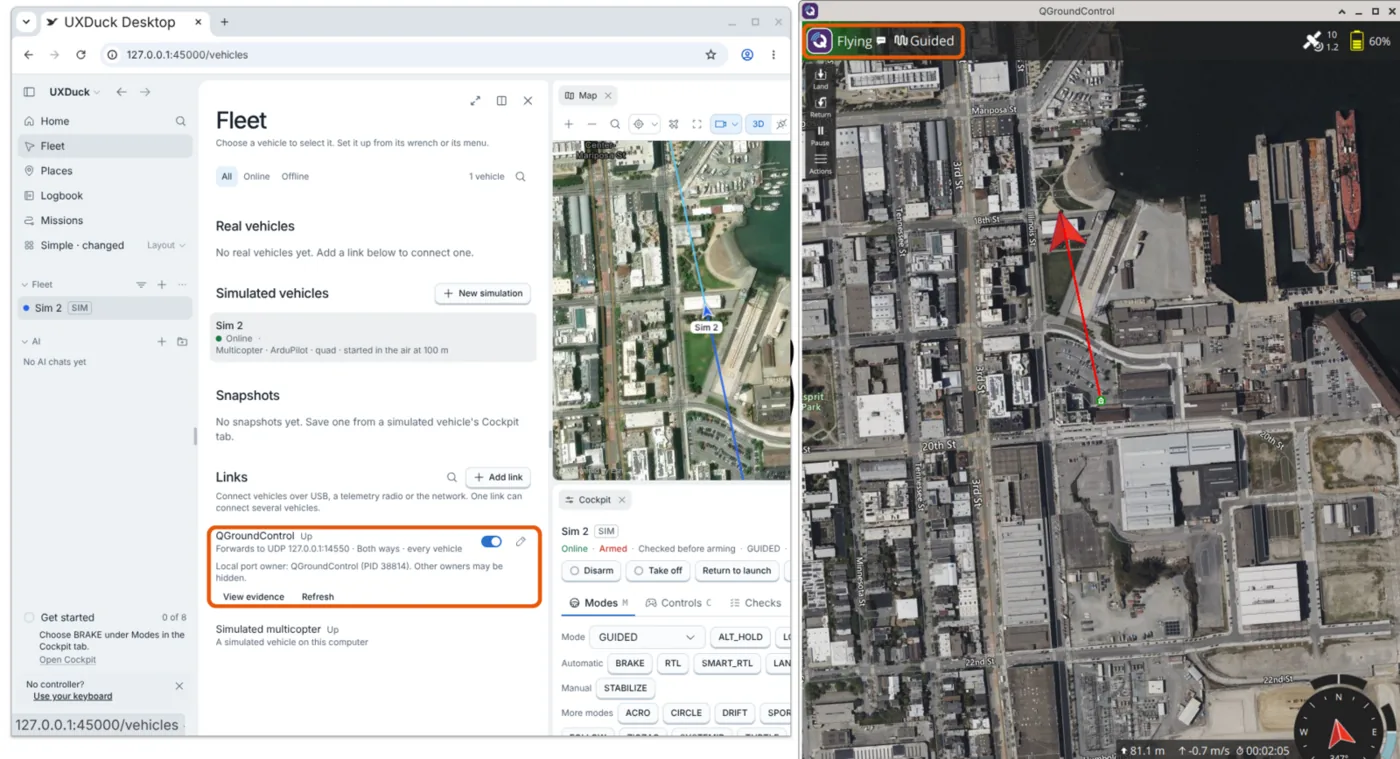
You don't have to switch everything at once. We checked these four steps with QGroundControl 5.1.5 open beside UXDuck 0.13.0 on one Linux computer, flying a simulated ArduPilot copter.
1. Send the same vehicle to both
On Fleet, choose Add link and Forward to a program, with Mission Planner's or QGroundControl's address. Both listen on 127.0.0.1:14550 by default (Connect a vehicle).
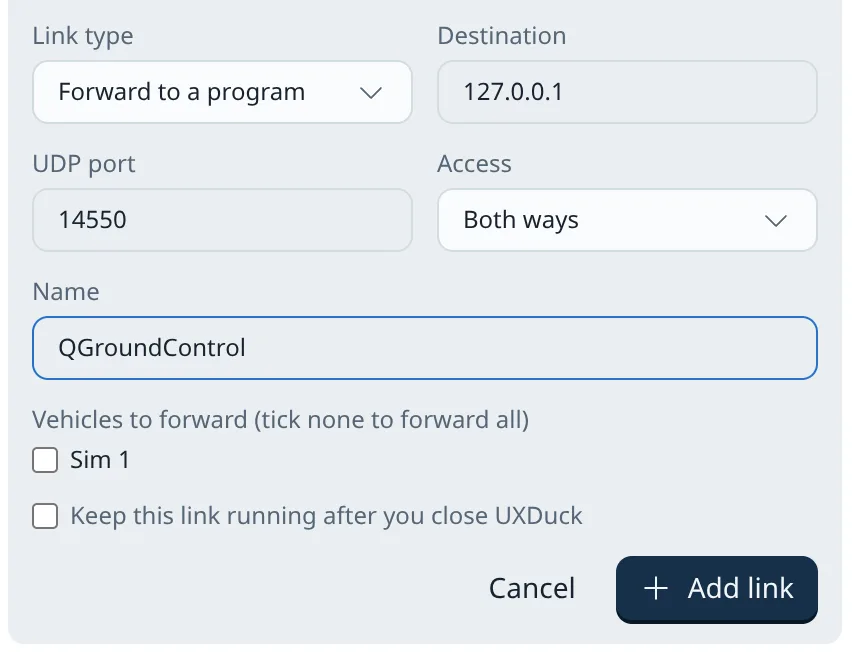
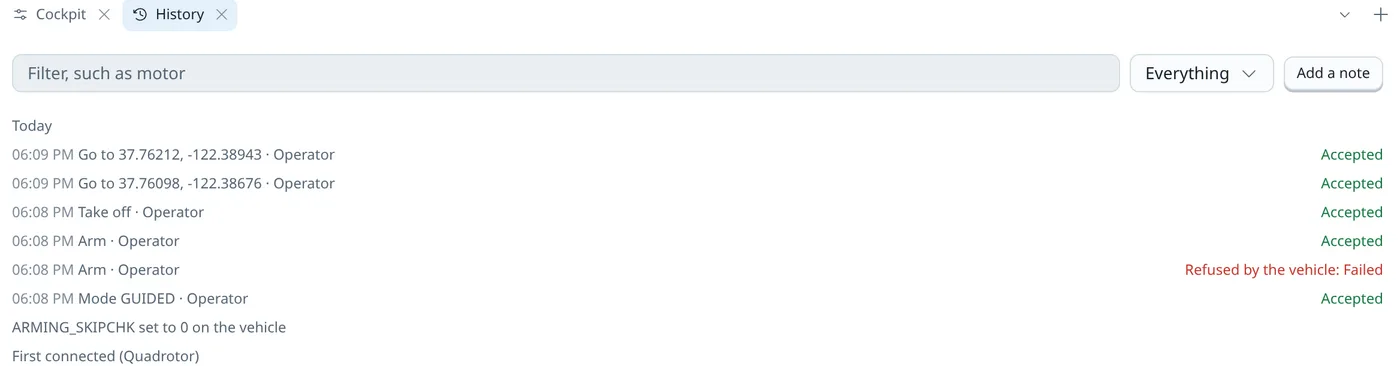
UXDuck's link then read "QGroundControl Up · Forwards to UDP 127.0.0.1:14550 · Both ways · every vehicle", and QGroundControl showed the copter "Flying" in "Guided" while UXDuck flew it. Commands from UXDuck still come back with a receipt, in the vehicle's History tab.
2. Open their flight logs where they are
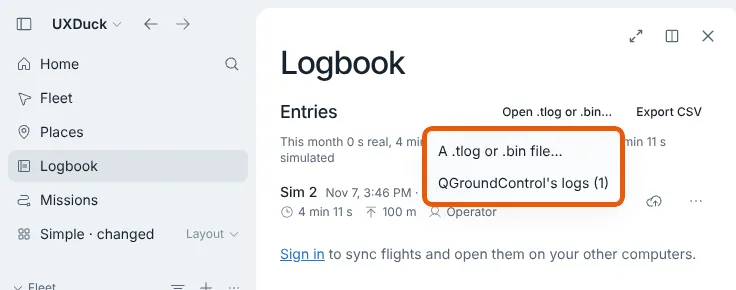
UXDuck looks in QGroundControl's Documents/QGroundControl/Telemetry and Mission Planner's Documents/Mission Planner/logs folders, lists their flights in the Logbook and replays them from the file. Nothing is copied (Replay). When we closed QGroundControl, it wrote 2026-11-07 15-51-42.tlog. The Logbook's Open .tlog or .bin… menu then offered "QGroundControl's logs (1)".
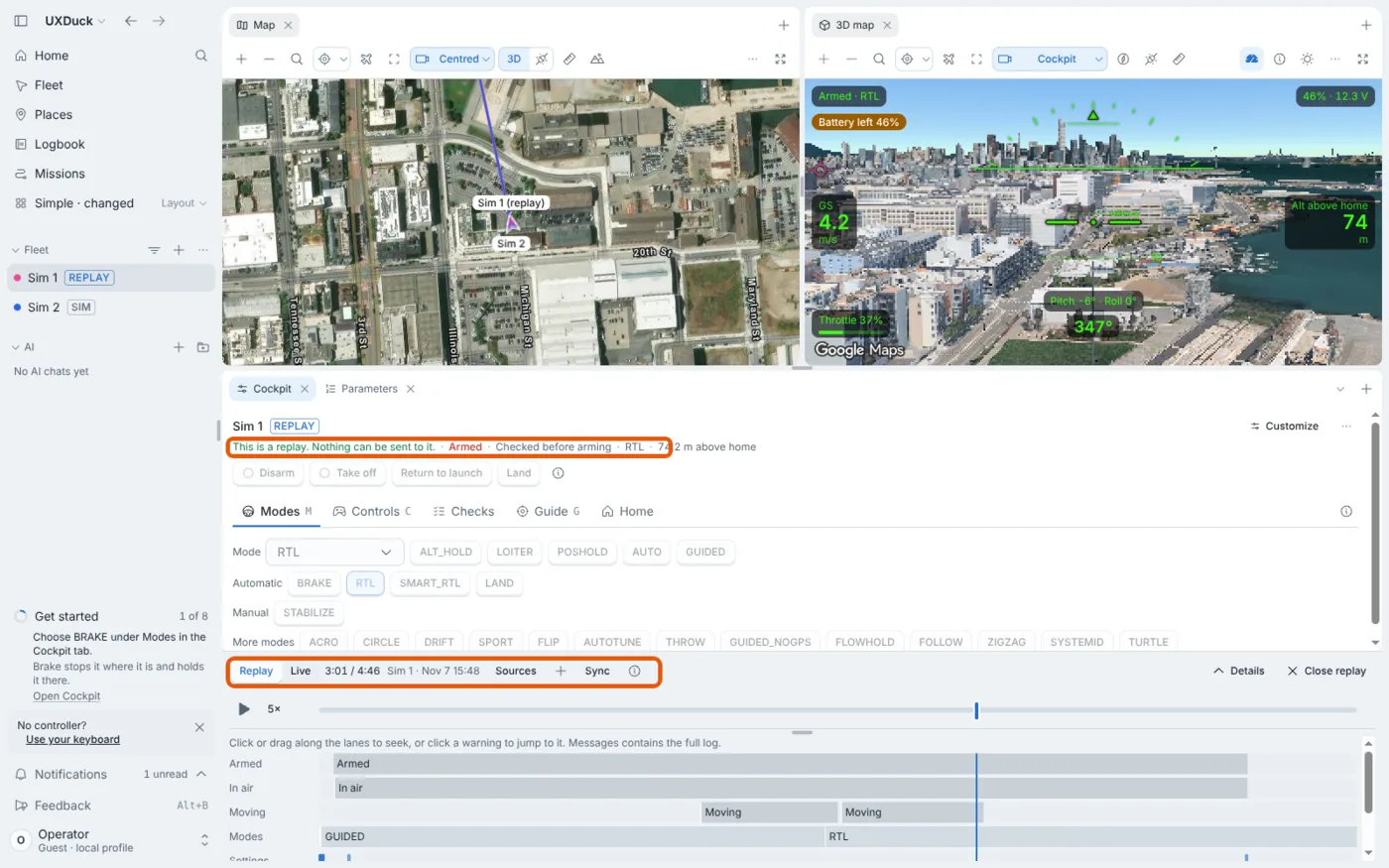
Then the 4 minute 46 second flight replayed in UXDuck with its arming, modes and settings changes on the timeline. A replay can't fly anything: "This is a replay. Nothing can be sent to it."
3. Move parameters both ways
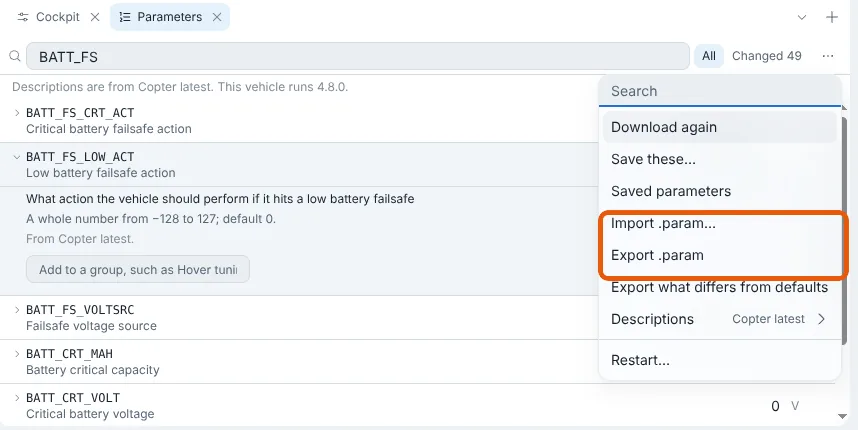
Export .param in the Parameters tab's menu saves the vehicle's values in Mission Planner's NAME,value format. Import .param… keeps a Mission Planner file as a saved set and compares it with the vehicle before anything is written (Parameters). Our export of the simulated copter held 1,427 parameters: a comment line naming the vehicle and the time, then one NAME,value line each, starting with ACRO_BAL_PITCH,1.
4. Bring your missions
On the Missions page, Open files… reads a QGroundControl .plan, Mission Planner's waypoint, fence and rally files, ArduPilot's fence text or KML into one plan. We opened a .plan from QGroundControl's own test files.
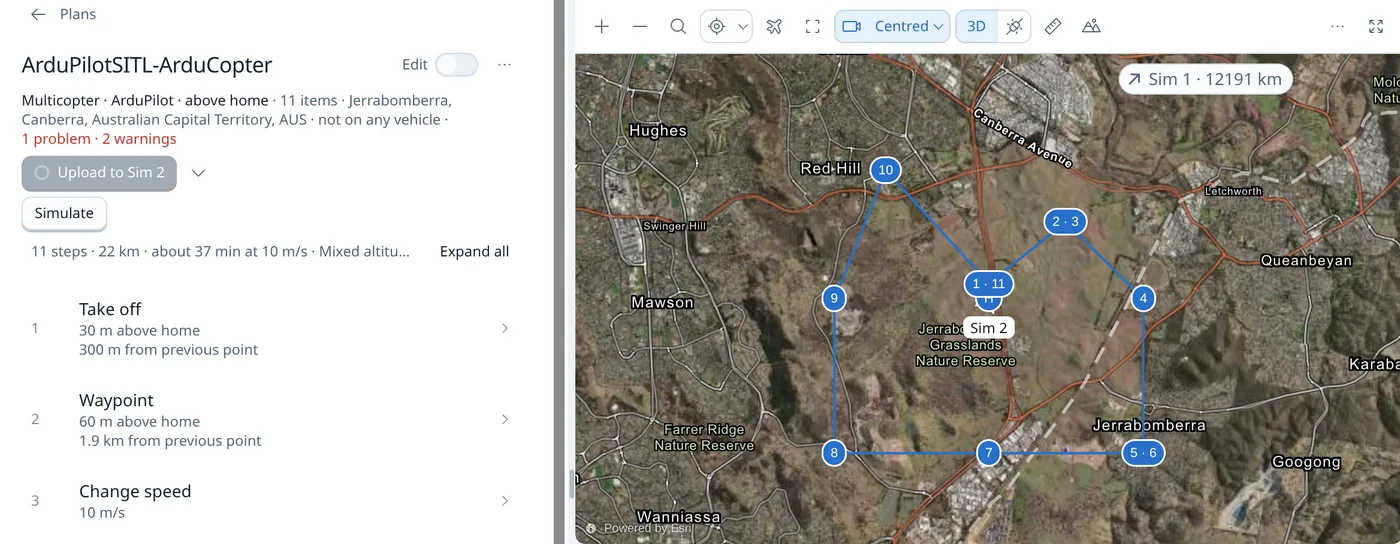
Before it uploads a plan, UXDuck checks it against the ground. After uploading, it reads the mission back from the vehicle and says where the vehicle kept something different from what was sent.
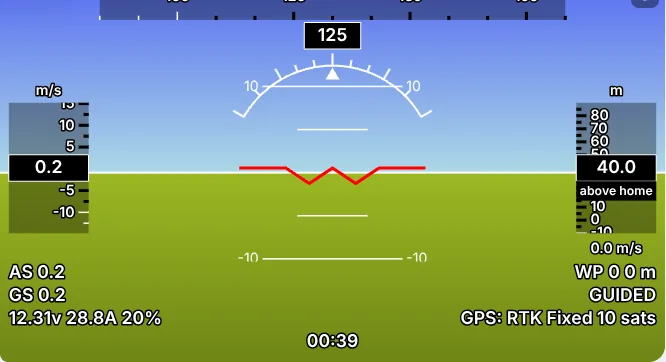
If Mission Planner's flight display is what you'd miss, Instruments (classic) draws the horizon, the speed and altitude tapes and the heading the way Mission Planner does (Telemetry, Cockpit and Messages).
Which ground control station should I choose?
- A new team member on a Windows laptop, flying ArduPilot: Mission Planner, because most ArduPilot guides and forum answers assume it. Fly UXDuck's browser simulator and Practice before the first real flight.
- A team on Macs, or flying from tablets: QGroundControl, or UXDuck, which runs natively on a Mac and in the browser. Mission Planner on a Mac means Parallels.
- A team flying PX4 as well as ArduPilot: QGroundControl.
- A lead standardising an ArduPilot team: forward one vehicle to UXDuck and to the ground station you use now, move one job to UXDuck, such as replays, parameters or simulation, then the next.
Try it
- Open app.uxduck.com and choose Start flying. A simulated VTOL takes off in your browser.
- To connect a real vehicle, download UXDuck for macOS, Windows, Linux or Raspberry Pi.
- Add a Forward to a program link to
127.0.0.1:14550, and open Mission Planner or QGroundControl beside it.
Frequently asked questions
Is Mission Planner or QGroundControl better for ArduPilot?
Mission Planner has more ArduPilot setup, a built-in simulator and geotagging, but it's officially Windows only. QGroundControl runs on Windows, macOS, Linux and Android, supports PX4 too, and since version 5.1 graphs DataFlash logs and uploads Lua scripts. Many ArduPilot users configure in Mission Planner and fly with QGroundControl.
Is there a Mission Planner for Mac?
Only an experimental development build, which is Intel-only and unsigned and has open crash-on-start issues. Mission Planner's README recommends running the Windows version in Parallels or Boot Camp. QGroundControl and UXDuck both have native macOS apps.
Is QGroundControl available on iPhone or iPad?
No. QGroundControl 5.x has no iOS download, and its developer guide says iOS is no longer a standard build. UXDuck's simulations run in Safari on an iPhone or iPad.
Does Mission Planner support PX4?
No. Mission Planner is for ArduPilot. QGroundControl supports PX4 and ArduPilot.
Are Mission Planner and QGroundControl free?
Yes. Mission Planner is GPLv3, and QGroundControl is dual-licensed Apache 2.0 and GPLv3. UXDuck is free for personal, non-commercial use and non-commercial academic use (Pricing).
Can I use UXDuck with Mission Planner or QGroundControl?
Yes. A Forward to a program link sends the same MAVLink to Mission Planner or QGroundControl on 127.0.0.1:14550 while UXDuck stays connected. UXDuck also finds and replays their telemetry logs, imports QGroundControl .plan files and Mission Planner waypoint files, and imports and exports Mission Planner .param files.
Does UXDuck support PX4?
UXDuck supports ArduPilot today, and PX4 support is planned.