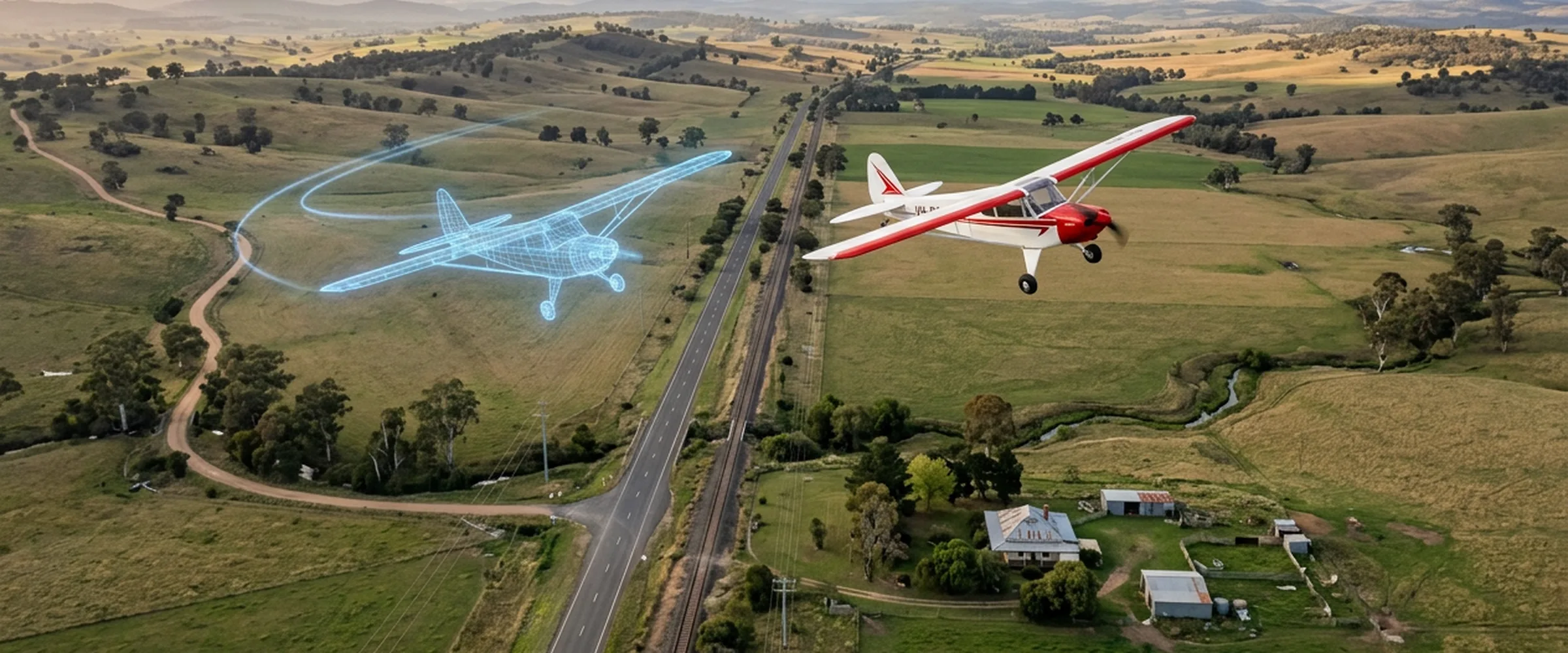
JSBSim isn't an alternative to ArduPilot SITL. SITL is ArduPilot itself, built to run on your computer. JSBSim is a flight dynamics model, and it's one of the physics backends SITL can fly against. So the real choice is between SITL's built-in physics, SITL with JSBSim, and SITL with a full simulator such as Gazebo.
Everything below was checked on 8 November 2026 against ArduPilot's developer docs and source, JSBSim's README and releases, and Gazebo's API docs. We also flew the same mission on ArduPlane 4.7.2 twice, once on SITL's built-in plane model and once on JSBSim 1.3.3, and watched both in UXDuck 0.13.0 on Ubuntu 24.04.
The short answer
| SITL, built-in physics | SITL with JSBSim | SITL with Gazebo | |
|---|---|---|---|
| What does the physics | Simple models inside SITL | JSBSim, a separate flight dynamics program | Gazebo's physics engine and plugins |
| Graphics | None, use a ground station's map | None, FlightGear can draw it | A 3D world with sensors and cameras |
| Vehicles | Every ArduPilot vehicle type | Planes, through ArduPilot's jsbsim frame | Copters, planes, rovers, boats and more, through ArduPilot's plugin |
| Extra install | Nothing | The JSBSim program | Gazebo and the ardupilot_gazebo plugin |
| Good for | Mission logic, parameters, failsafes, scripts, quick checks | A plane whose aerodynamics, wind and turbulence matter more | Cameras, obstacles, indoor flight, swarms, rovers and boats in a world |
Sources for each row are in the sections below.
What SITL is
ArduPilot's docs describe SITL as "a build of the autopilot code using an ordinary C++ compiler, giving you a native executable that allows you to test the behaviour of the code without hardware" (ArduPilot SITL). The flight code is the same code that runs on a flight controller. Only the sensors and the physics are simulated.
By default SITL brings its own physics. The built-in plane model says plainly what it's for. Its source calls it a "very simple plane simulator class. Not aerodynamically accurate, just enough to be able to debug control logic for new frame types" (SIM_Plane.cpp). Its lift and drag functions come from the last_letter simulator.
That's fine for most of what people use SITL for: a mission, a failsafe, a parameter change, a Lua script or a ground station.
What JSBSim is
JSBSim's README calls it a "multi-platform, general purpose object-oriented Flight Dynamics Model (FDM) written in C++" (JSBSim). Aircraft are described in XML, and it runs "in a standalone batch mode flight simulator (no graphical displays a.k.a. console mode)" or inside FlightGear, Unreal Engine and other simulators. ArduPilot's list of simulators puts it as "a sophisticated open-source plane and multicopter simulator with no graphical interface" (ArduPilot simulators).
In ArduPilot, JSBSim is a frame you pick when you start SITL. SITL starts the JSBSim program, sends it control surface and throttle positions, and reads the aircraft's state back. ArduPilot's default JSBSim aircraft is the Rascal 110, and you can choose another model in Tools/autotest/aircraft/ (ArduPilot: Using SITL with JSBSim). SITL also passes its wind setting to JSBSim, with turbulence, so SIM_WIND_SPD and SIM_WIND_DIR work as they do with the built-in models (SIM_JSBSim.cpp).
The data flows like this:
- JSBSim works out how the aircraft moves.
- ArduPilot SITL flies it, as it would a real plane.
- SITL sends MAVLink to your ground station.
You no longer need a special JSBSim. "As of December 2018 that is no longer the case, and we can use the standard JSBSim releases" (ArduPilot).
Where Gazebo fits
Gazebo is a robotics simulator with a 3D world. ArduPilot's docs say it's "particularly useful for defining autonomous indoor flights, swarms, non-flying vehicle types such as rovers and boats, and multi-vehicle scenarios such as the ship landing simulation" (ArduPilot: Using SITL with Gazebo). It connects through ArduPilot's ardupilot_gazebo plugin.
For planes, Gazebo's LiftDrag system "computes lift and drag forces enabling simulation of aerodynamic robots" (Gazebo). You give each lifting surface a lift curve made of two straight lines, one before stall and one after, with drag slopes and a centre of pressure. What Gazebo adds is everything around the vehicle: cameras, lidar, obstacles, other robots.
ArduPilot's Gazebo guide covers Gazebo Garden and Harmonic on Ubuntu 20.04 and 22.04 and on macOS Big Sur, Monterey and Ventura.
One mission, two physics models
We flew ArduPilot's CMAC-toff-loop mission, a take-off and then a loop at 100 m, on ArduPlane 4.7.2. One SITL used the built-in plane model with its default parameters. The other used the jsbsim frame, the Rascal 110 and ArduPilot's plane-jsbsim.parm. Both flew in a 5 m/s wind from the west, in real time, for eight minutes, and we logged them once a second. The cruise numbers start 30 seconds after each plane reached 90 m.
| Built-in plane model | JSBSim, Rascal 110 | |
|---|---|---|
| Take-off to 90 m | 27.6 s | 28.7 s |
| Height at cruise, mean (spread) | 100.3 m (98.7 to 102.4) | 100.0 m (95.4 to 105.5) |
| Airspeed, mean (spread) | 22.0 m/s (21.3 to 23.6) | 22.4 m/s (20.6 to 28.1) |
| Steepest bank | 61° | 69° |
| Pitch range | −7° to 9° | −14° to 15° |
| Throttle, mean (range) | 48% (32 to 93) | 26% (0 to 100) |
| Time per lap | 83 to 84 s | 85 to 86 s |
An earlier pair of runs gave the same picture, within a few tenths.
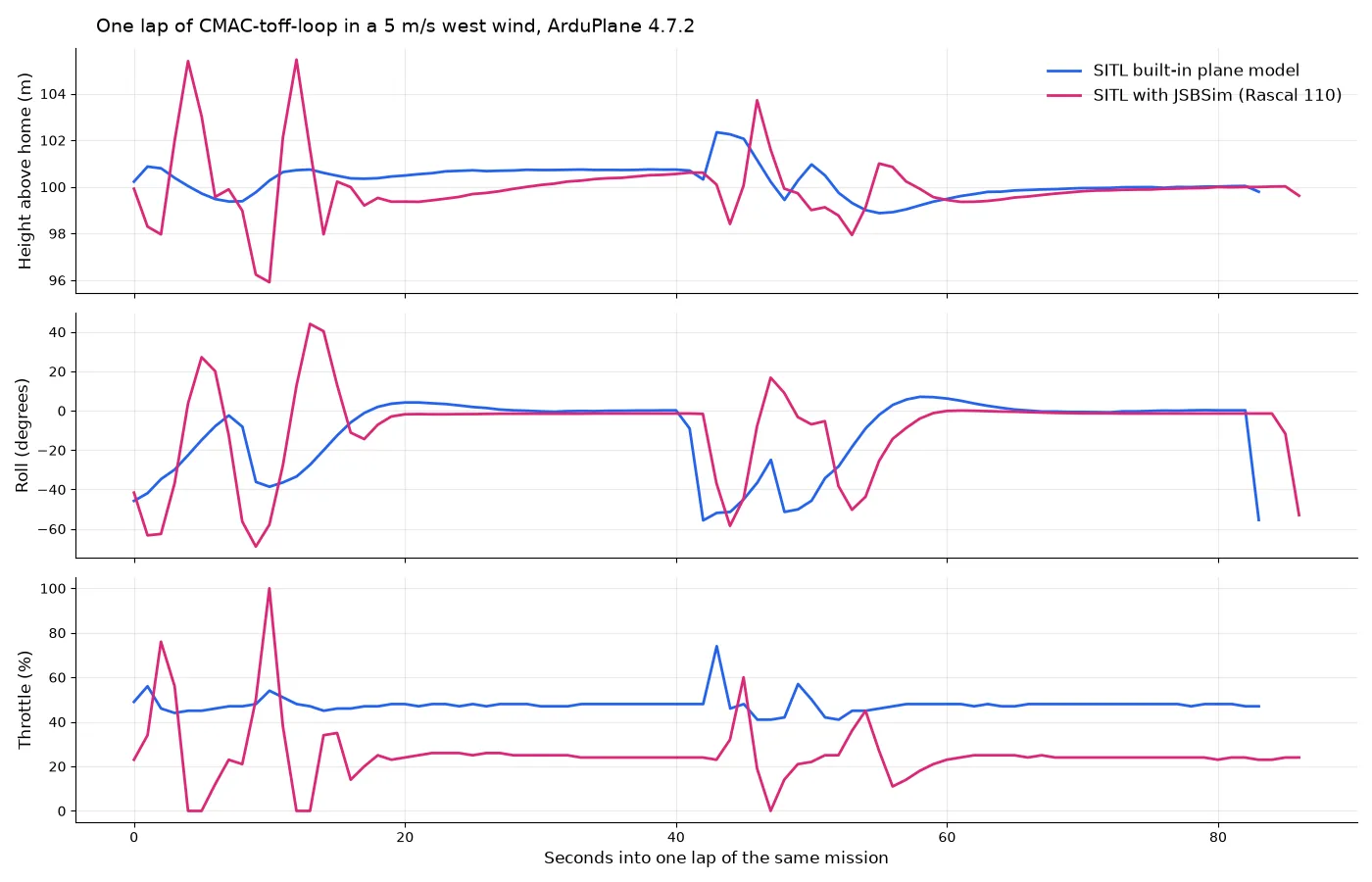
Both planes flew the mission. On the straights they look almost the same. In the turns they don't. The built-in model banks, holds the bank and rolls out. The Rascal on JSBSim overshoots, rolls the other way past 40°, and works its throttle between idle and full to hold height, so it wanders about 5 m either side of 100 m.
This doesn't show that one is more accurate. They aren't the same aircraft, and neither is your aircraft. It shows that the physics model changes what you see, so a tune or a turn that looks clean on one may not on the other. If you test a plane's behaviour in the air, test it on the physics model closest to that plane.
Things to know before you start
Install the JSBSim program, not only the Python package. SITL starts an executable called JSBSim. pip install jsbsim gives you the Python module (with wheels for Windows, macOS and Linux on PyPI) and a lowercase jsbsim script, but no JSBSim program. JSBSim's releases include .deb packages for Ubuntu 22.04 and 24.04 and a Windows installer. On macOS, or for another Linux, build it with CMake as ArduPilot's guide shows, or with Tools/scripts/build-jsbsim.sh.
Stop it with sim_vehicle.py. sim_vehicle.py cleans up JSBSim when it exits. We started the arduplane program directly, and stopping it left JSBSim running. Stray copies piled up, and one live SITL stopped with "Failed to send on control socket: Broken pipe" while we cleaned them up. If you start SITL yourself, check for leftover JSBSim processes before the next run.
The ground under JSBSim is flat. The JSBSim backend reports height as JSBSim's height above its ground plus home's altitude (SIM_JSBSim.cpp). So hills don't exist for the physics, even when your ground station draws them. SITL's built-in models use ArduPilot's terrain data when SIM_TERRAIN is on, which is the default.
Windows takes more work. SITL on Windows runs under Cygwin or WSL. JSBSim publishes a Windows build, but we haven't tested ArduPilot with JSBSim on Windows, and an ArduPilot issue from November 2024 reports repeated "link down" with JSBSim under Cygwin.
Watch it in UXDuck
SITL sends MAVLink, so any ground station can fly it. In UXDuck, open Home › Connect a real vehicle › Your own simulator. It shows the UDP port UXDuck listens on, 15010 or the next free one up to 15019. Then start SITL with JSBSim and send it there:
sim_vehicle.py -v ArduPlane -f jsbsim --out=udp:127.0.0.1:15010Use your computer's address instead of 127.0.0.1 if SITL runs on another machine (Your own simulator).
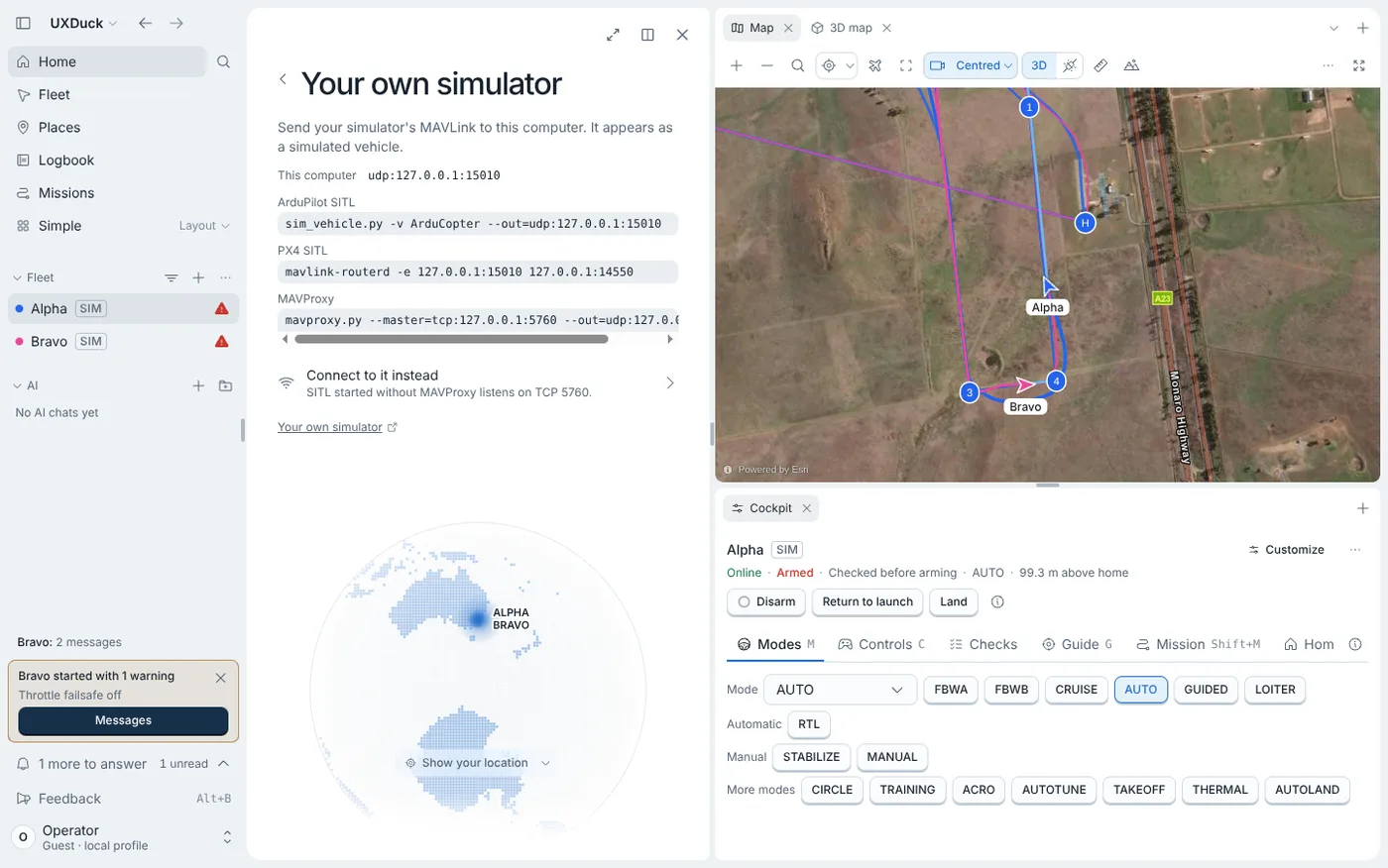
We ran both planes at once. They showed up as two simulated vehicles, on one map, with their own Cockpit. The simulations UXDuck starts by itself, in the app or in the browser, use SITL's built-in physics. For JSBSim, run SITL yourself and send it to UXDuck as above.
Which one should you use?
Start with SITL's built-in physics. It's already there, it starts in seconds, and it has models for every ArduPilot vehicle type. Most mission, failsafe, parameter and scripting work doesn't need more.
Add JSBSim when you're working on a plane and its aerodynamics matter: a new airframe with its own JSBSim model, wind and turbulence, or a tune you want to check against something closer to the real aircraft.
Add Gazebo when the world matters: a camera, obstacles, indoor flight, several vehicles, or a rover or boat that meets things.
Try it
Open UXDuck to fly a simulated ArduPilot vehicle in your browser, or install it and connect your own SITL.
Frequently asked questions
Is JSBSim better than ArduPilot SITL?
They aren't the same kind of thing. SITL is ArduPilot running on your computer. JSBSim is a flight dynamics model that SITL can use for a plane's physics instead of its built-in model. You still run SITL either way.
Is SITL's built-in plane model realistic?
Not aerodynamically. Its source says it's "not aerodynamically accurate, just enough to be able to debug control logic for new frame types". It's good for testing what ArduPilot does, less so for how a particular plane flies.
Does JSBSim have graphics?
No. JSBSim is the physics only. ArduPilot's guide shows FlightGear drawing a JSBSim flight, and a ground station such as UXDuck shows it on a map.
Can I use JSBSim with ArduCopter?
JSBSim can model multicopters, but ArduPilot's jsbsim frame is for ArduPlane. For copters, use SITL's built-in models or Gazebo.
Does pip install jsbsim work for ArduPilot SITL?
Not on its own. It installs the Python module, but SITL needs the JSBSim program. Install a JSBSim release package or build it from source.
Does JSBSim simulate terrain in SITL?
No. With ArduPilot's JSBSim backend, the ground is flat at home's height. SITL's built-in models use ArduPilot's terrain data.