If your company runs its own ArduPilot fork, with extra MAVLink messages from a payload or companion computer, its own parameters and its own mission commands, you shouldn't have to fork and rebuild your ground control station (GCS) as well. In UXDuck you add the fork's MAVLink XML and parameter descriptions once, tied to the commits that carry them, and every vehicle running those builds decodes its messages, describes its parameters and plans with its commands. Nothing gets recompiled on the ground.
Mission Planner and QGroundControl are free, mature and maintained in the open, and most fork teams use one of them. UXDuck works alongside them. This post is for the engineers who maintain a fork and keep hitting the same wall, which people describe in public, again and again. Each section below cites one of those threads and then shows the same thing done in UXDuck, on a real fork running in ArduPilot's simulator (SITL).
Ben, UXDuck's founder: "I'm a product engineer. I've travelled to train drone operators and worked closely with pilots and hardware engineers. What they need in the field decides what UXDuck does next, and it ships several releases a week."
Everything below is in UXDuck 0.13.0 unless it's marked 0.14.0.
Why do ArduPilot fork teams end up rebuilding their ground station?
Because both of the usual ground stations compile MAVLink in. In 2024 someone asked on ArduPilot Discourse whether Mission Planner could show their custom message, and Andras Schaffer, a Mission Planner developer, answered: "No, if you defined your own mavlink messages then you have to rebuild the mavlink libraries on the ground and on the air side as well" (ArduPilot Discourse). An earlier asker took the route as given: "I now need to recompile Mission Planner by adding the same message to ExtLibs\Mavlink\message_definitions\ardupilotmega.xml and update mavlink via running regenerate.bat" (ArduPilot Discourse, viewed 1,600 times).
QGroundControl is the same. Its guide says to add messages to its XML "or fork QGroundControl and include your own dialect" (QGC dev guide). Don Gagne, its lead developer, told one team: "You need to recompile QGC to get it to show up" (QGC #11088). In 2025 a team moving to QGC v5 found that their old CMake variables no longer pulled in their dialect, and the maintainers' suggestions were more CMake (QGC #13479). PX4's documentation spells out where this leads: "If you use a custom definition you will fork and maintain PX4, your ground station, and any other SDKs that communicate with it" (PX4 docs).
To be fair to both, there are workarounds. Mission Planner can add a command to its Plan screen by its number under Manage Command List, and its parameter descriptions can be replaced by editing a file and making it read-only (ArduPilot Discourse). QGroundControl can send arbitrary commands from buttons. None of these decodes a new message, and each is set up by hand on each computer.
How UXDuck handles it. UXDuck reads a fork's MAVLink XML at run time and keeps it per commit. The vehicle reports the commit its firmware was built from, so UXDuck knows which definitions apply to which vehicle, with nobody choosing.
What does a fork's change look like?
The examples below use a small sample fork made for this post: an agricultural sprayer on ArduCopter, branched from ArduPilot at d5420ff (ArduCopter V4.8.0-dev). It adds one message, one mission command, an enum and two parameters. The firmware side is about 80 lines across 7 files, plus this dialect, included from ardupilotmega.xml:
<?xml version="1.0"?>
<mavlink>
  <!-- Acme's sprayer: one message and one mission command, added in our ArduCopter fork. -->
  <enums>
    <enum name="ACME_SPRAY_STATE">
      <description>What the sprayer is doing.</description>
      <entry value="0" name="ACME_SPRAY_IDLE">
        <description>Not spraying.</description>
      </entry>
      <entry value="1" name="ACME_SPRAY_ON">
        <description>Spraying.</description>
      </entry>
      <entry value="2" name="ACME_SPRAY_EMPTY">
        <description>The tank is empty.</description>
      </entry>
    </enum>
    <enum name="MAV_CMD">
      <entry value="43010" name="MAV_CMD_ACME_SPRAY" hasLocation="false" isDestination="false">
        <description>Spray for a time, then stop.</description>
        <param index="1" label="Rate" units="L/h" minValue="0">Flow rate.</param>
        <param index="2" label="Seconds" units="s" minValue="0">How long to spray.</param>
        <param index="3" label="Nozzles" minValue="1" maxValue="4" increment="1">How many nozzles to open.</param>
      </entry>
    </enum>
  </enums>
  <messages>
    <message id="43010" name="ACME_SPRAY_STATUS">
      <description>The sprayer's state, sent at 3 Hz.</description>
      <field type="uint32_t" name="time_boot_ms" units="ms">Time since boot.</field>
      <field type="float" name="flow" units="L/h">Flow rate.</field>
      <field type="float" name="tank" units="L">Left in the tank.</field>
      <field type="uint8_t" name="state" enum="ACME_SPRAY_STATE">What the sprayer is doing.</field>
      <field type="uint8_t" name="nozzles">Nozzles open.</field>
    </message>
  </messages>
</mavlink>
The parameters are ACME_TANK_L (litres, default 10) and ACME_NOZZLES (an int8, values 1, 2 or 4, default 2). A message id above 255 needs MAVLink 2, and a private dialect can use any range it likes (MAVLink guide). The units have to be ones MAVLink's schema lists, and L/h and L are.
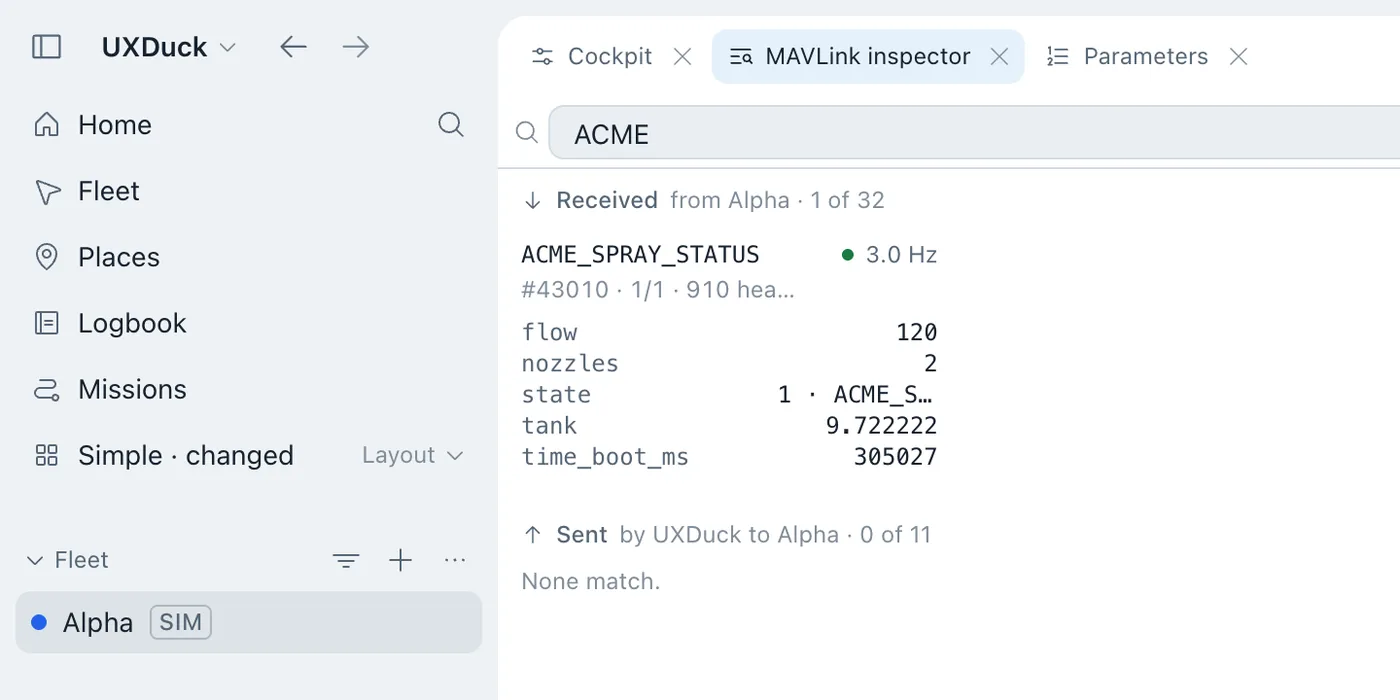
Before UXDuck knows the dialect, the message still shows up in the MAVLink inspector, by its number:
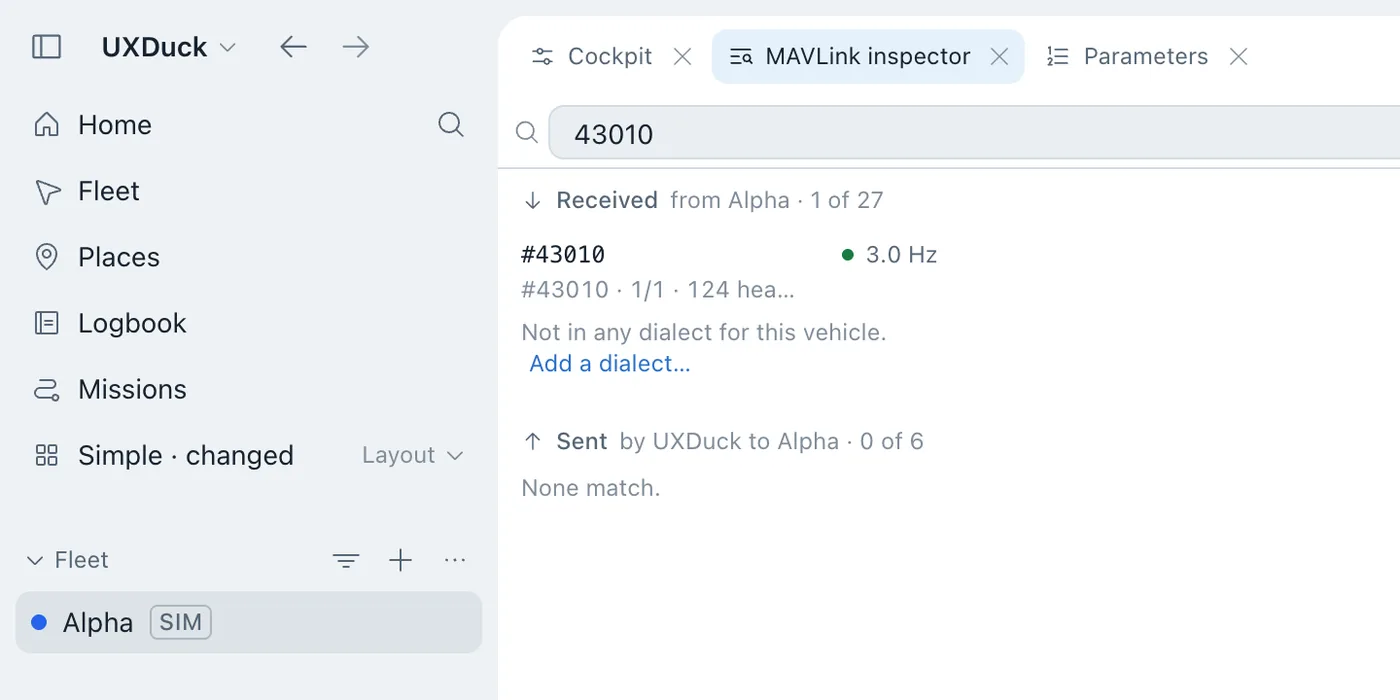
How do I decode my fork's custom MAVLink messages without rebuilding the GCS?
Give UXDuck the XML once. In Settings › MAVLink messages, add the fork's XML files and give the commit of each build that carries them (Parameters).
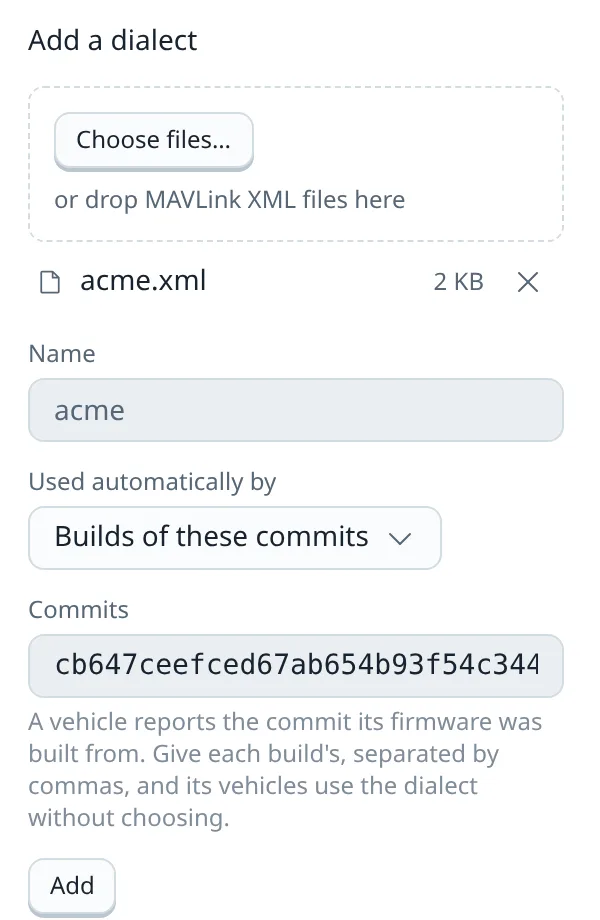
UXDuck keeps only what differs from the MAVLink it already knows. The dialect is used by builds of that commit, so the simulated vehicle, which reports cb647cee, picked it up by itself. The list says which vehicles use each dialect. The one below was generated from the fork's whole checkout, so besides the fork's ACME_SPRAY_STATUS it carries a few newer ArduPilot messages: 6 new and 2 changed.
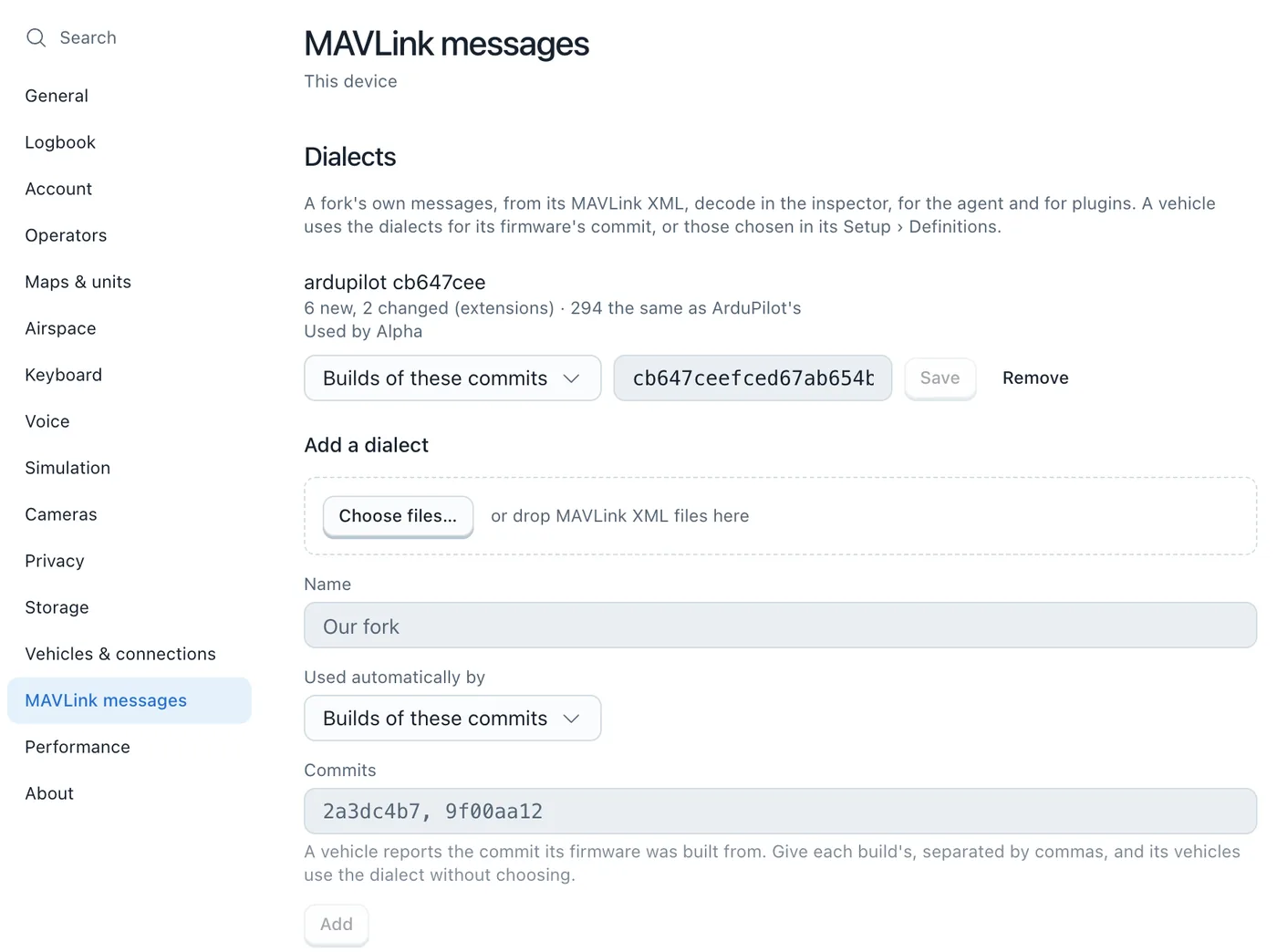
Prefer the terminal, or adding it from CI? From the checkout that built the firmware, uxduck mavlink dialects generate path/to/ardupilot reads its ardupilotmega.xml and every file it includes.
The inspector then decodes the message by name, with the enum named. Here it is while the mission's spray command runs:
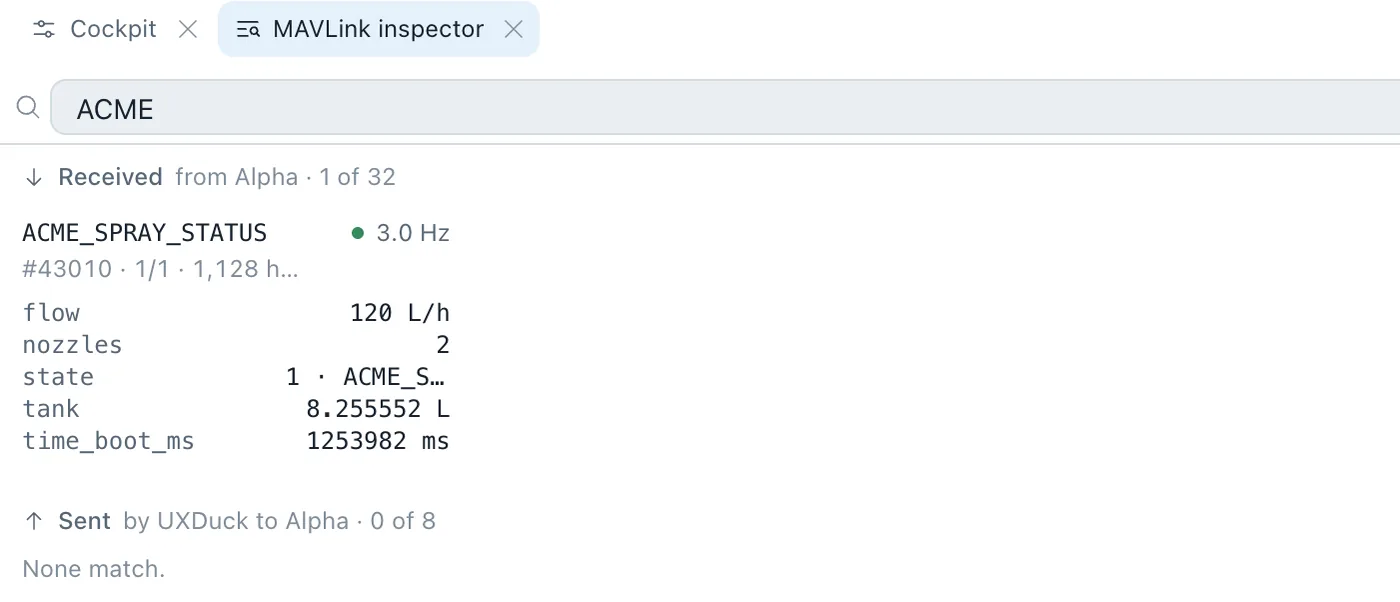
0.14.0 adds each field's units from the XML, in the inspector and for the agent:
A dialect that changes a standard message applies only to the vehicles on those builds, or to the ones it's chosen for in their setup's Definitions. Your other vehicles keep decoding standard MAVLink as they always did.
How do I get descriptions for my fork's own parameters?
ArduPilot's published descriptions are built from master and release branches, so a fork's own parameters arrive with a name and a value and nothing else. That's the problem in the Mission Planner thread above, and in an ArduPilot issue where a maintainer explained that ground stations pull descriptions built "from master / release branches" (ArduPilot #17921).
How UXDuck handles it. In Settings › Vehicles & connections › Parameter descriptions, add your firmware's own descriptions from a file, or from the URL your CI publishes them at (Parameters). Descriptions are generated from the source, so for a checkout that's one command: uxduck params definitions generate path/to/ardupilot --vehicle Copter, which needs Python 3 with lxml. That's how the sample's set, Copter cb647cee, was made.
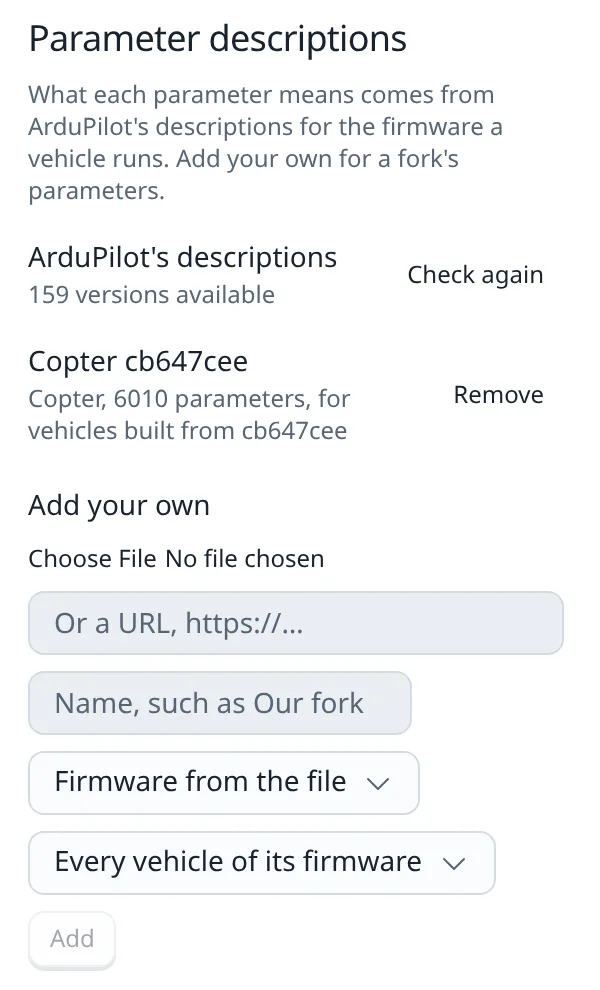
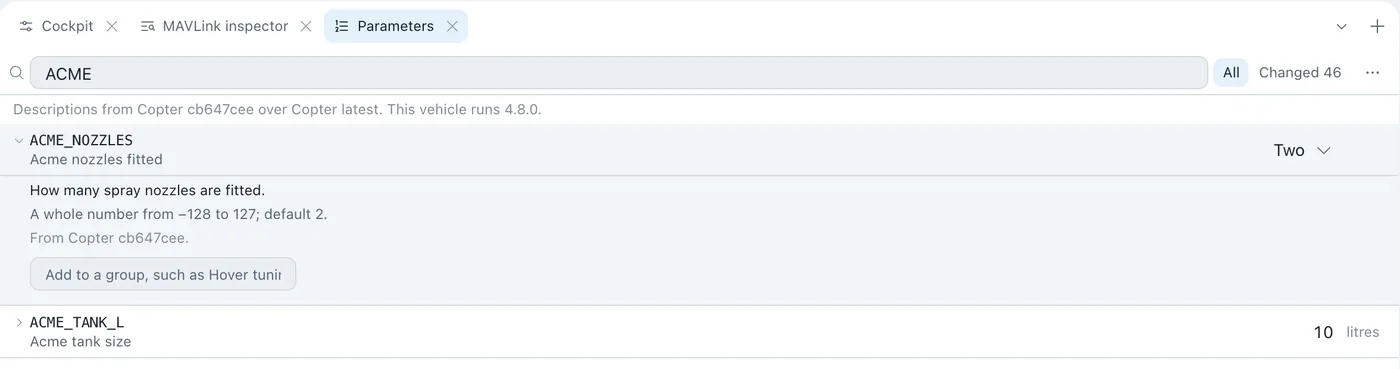
The set records its commit and applies only to firmware built from it, so a vehicle on another build never gets descriptions that don't match. The Parameters tab says where they came from:
If your CI publishes a firmware profile, a file naming each build's parameter descriptions and MAVLink XML, add its URL under Firmware profiles in Settings › MAVLink messages. UXDuck fetches it again every day, so new builds arrive with their definitions (Parameters).
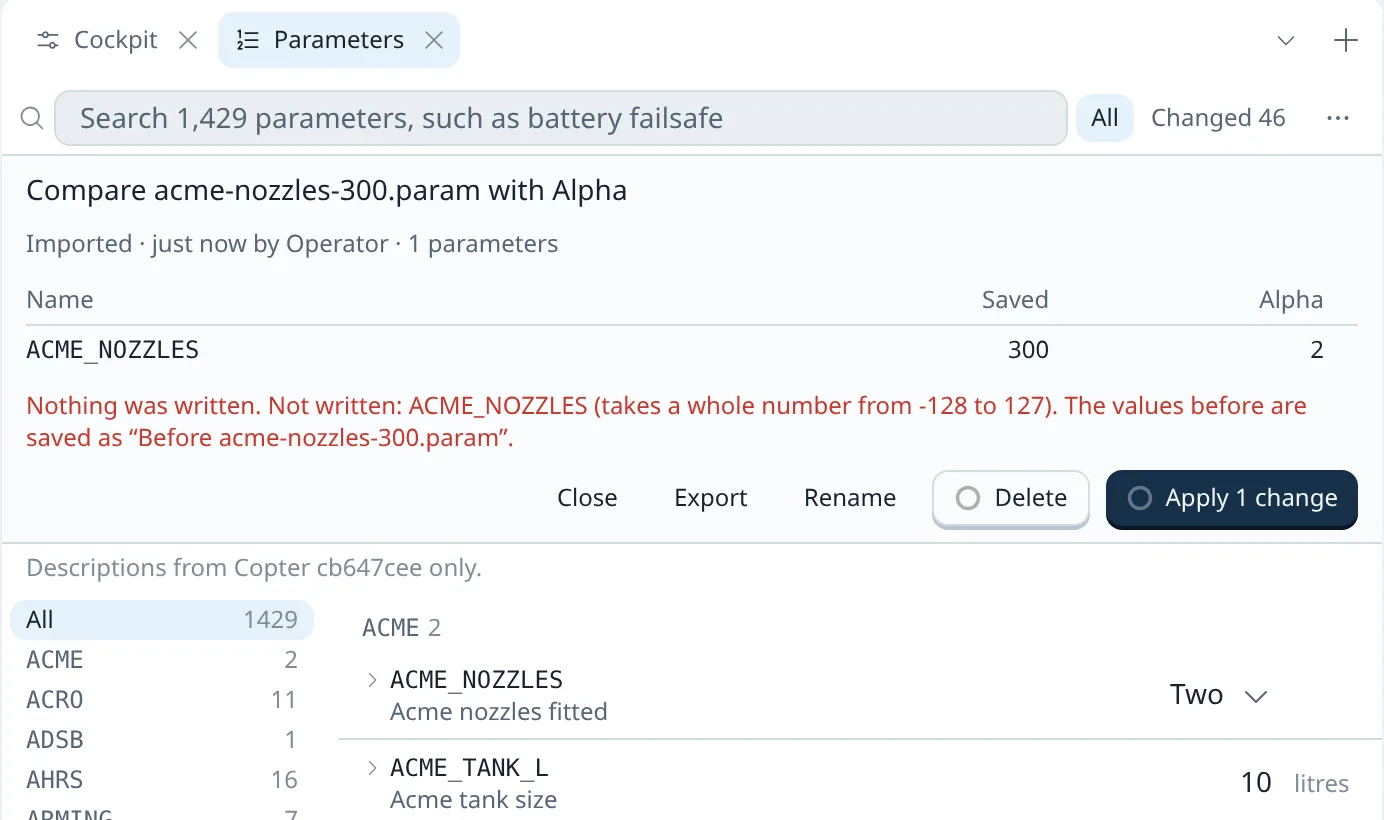
0.14.0 also keeps a parameter's type. A value it can't hold is refused before anything is sent, because an autopilot would clamp or wrap it. ACME_NOZZLES is an int8. In the Parameters tab it only offers the values its description lists, One, Two and Four, and a .param file asking for 300 is stopped at Apply:
Can I plan missions with my fork's own mission commands?
This is where Mission Planner users get stuck after rebuilding. One wrote: "I was expecting to see my new command in the dropdown (Plan tab)", and asked: "How can I get it to display in there?" (ArduPilot Discourse). He found Manage Command List, and then hit the next problem: "the moment I select my command the path lines on the map disappear!" Nobody answered his follow-up.
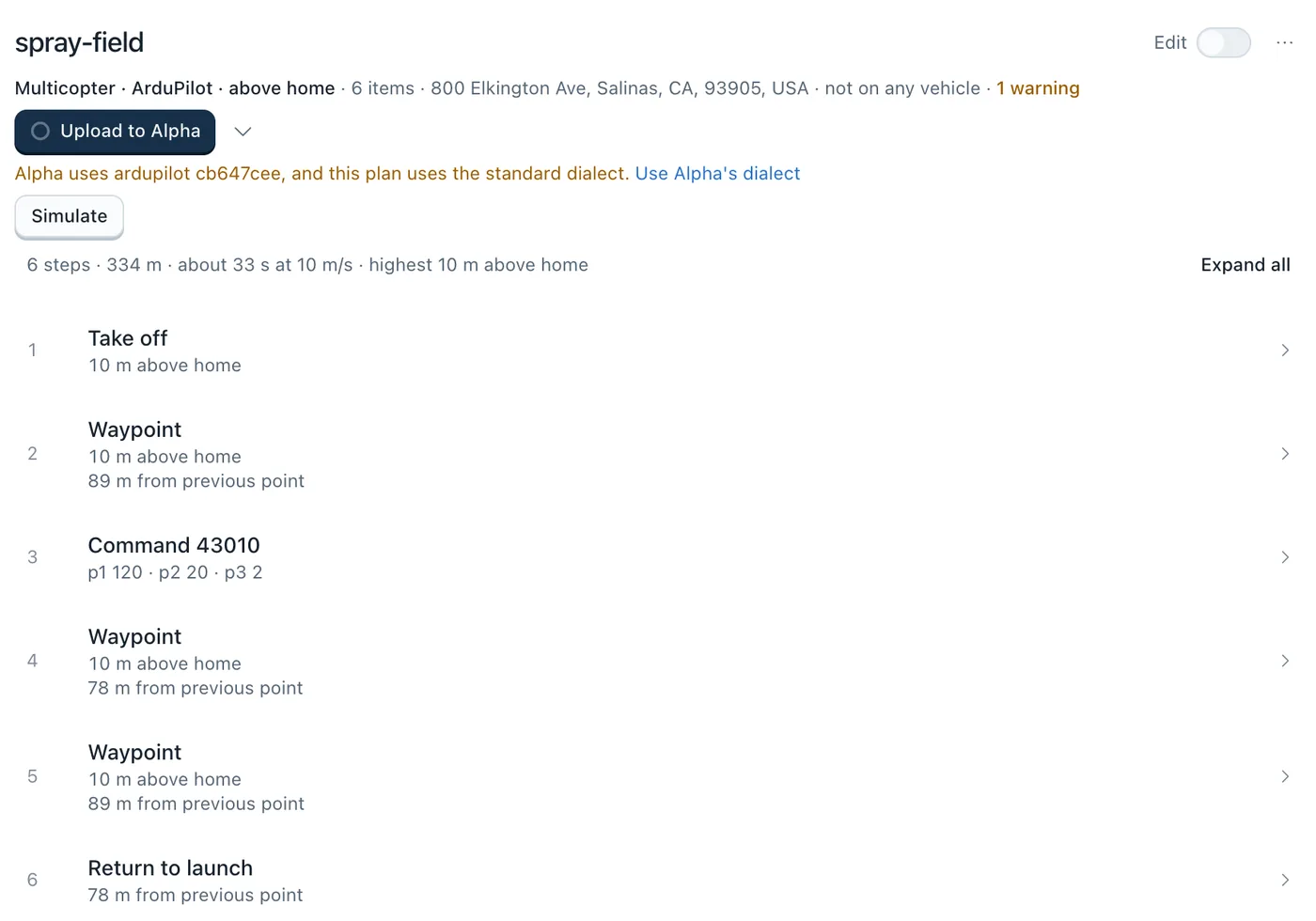
How UXDuck handles it. A plan uses the vehicle's dialect for its commands. Here's a mission file with the spray command as item 3, spray-field.waypoints, opened from the Missions page. On the standard dialect, item 3 is just a number, and UXDuck says the vehicle uses something else:
One click on Use Alpha's dialect, in Edit, and the command has its name, labels and units, and stays in the route:
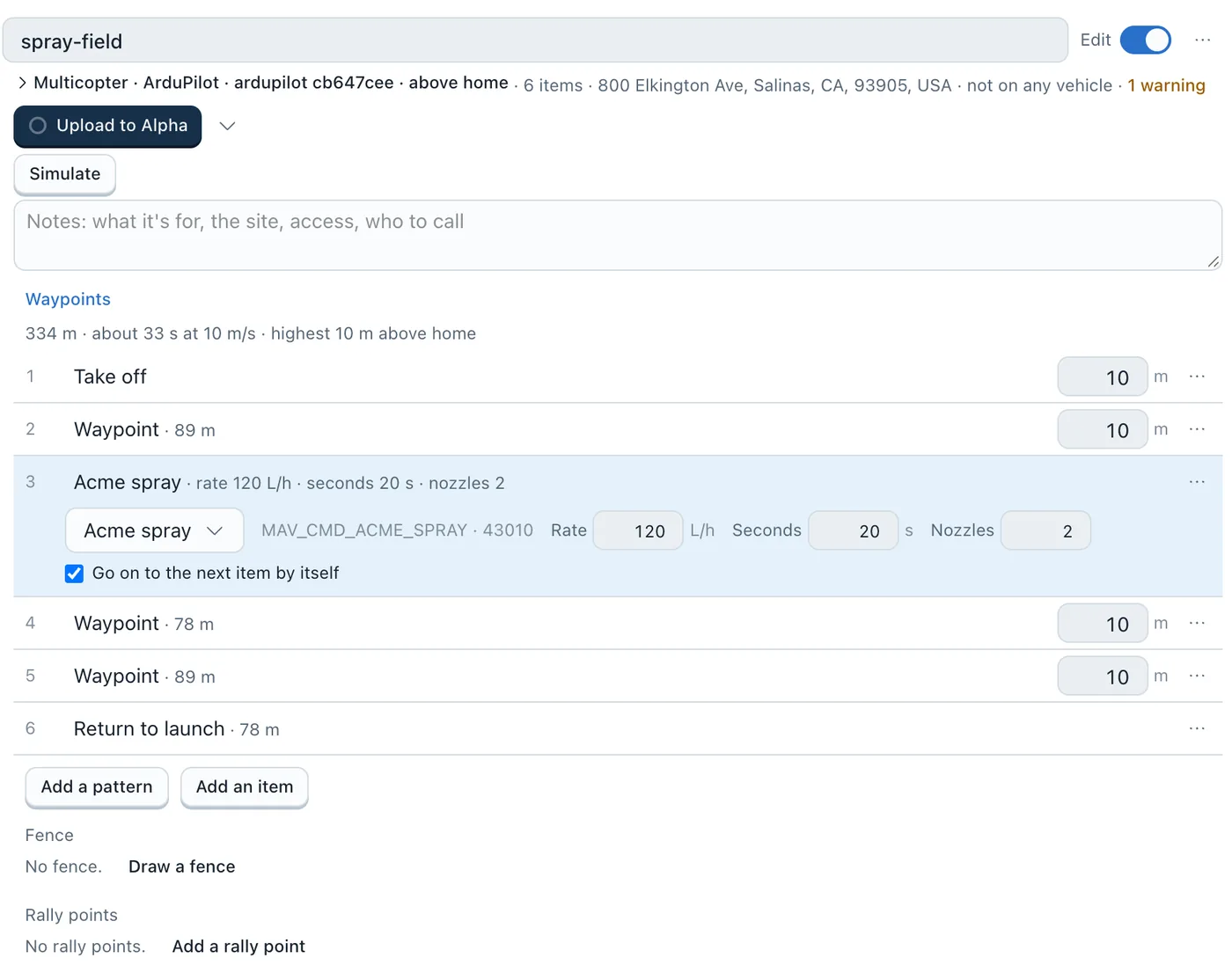
Upload reads the mission back from the vehicle and compares it item by item. That check caught a real bug while this sample was being built: the fork's first version didn't copy the command's third parameter in AP_Mission, so Nozzles came back as 0, and UXDuck reported "item 3 came back different". Any fork that adds a mission command has to store each parameter there, whatever ground station it uses.
ArduPilot gives a command without a place back in another frame. In 0.13.0 that still reads as "item 3 came back different", even with the parameters right. 0.14.0 knows the fork's command has no place, from hasLocation="false" in the XML, and verifies it:
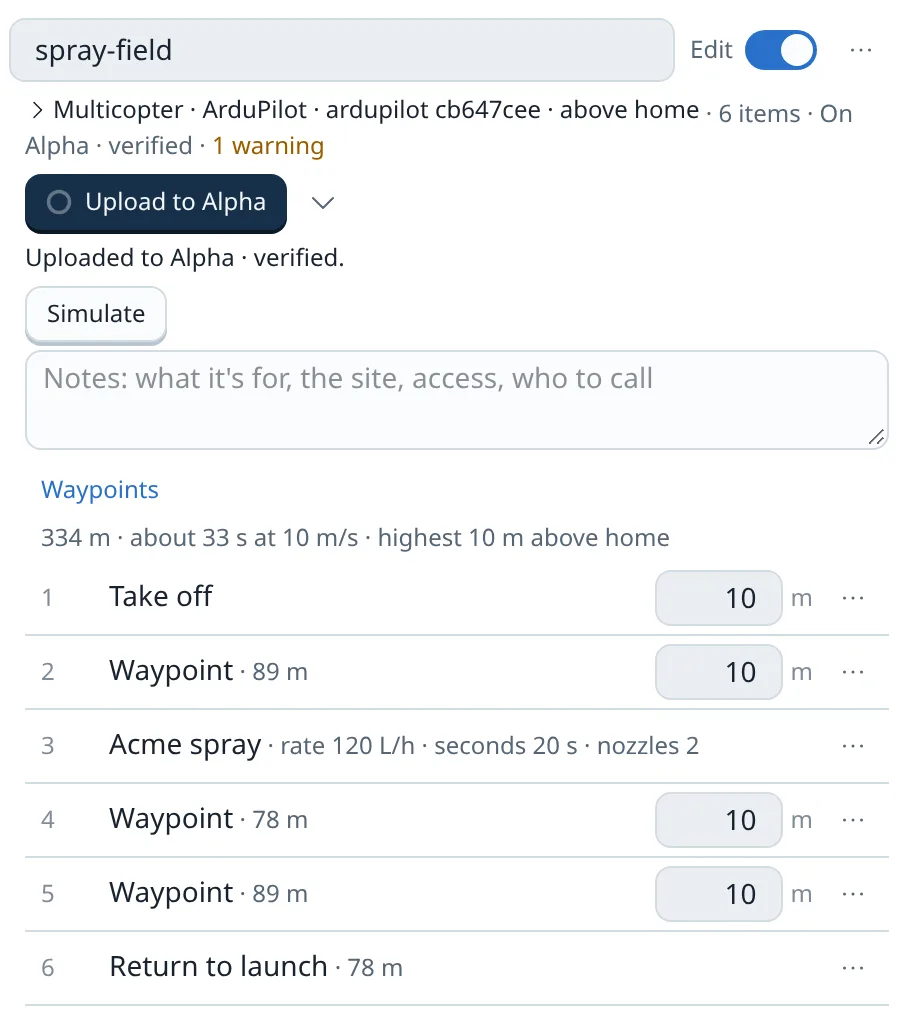
A dialect added in 0.13.0, in Settings or from a terminal, needs adding again after updating to 0.14.0, before its commands without a place are verified on readback. A dialect from a firmware profile updates on its own.
In 0.14.0, the mission the vehicle holds names the command too, under Missions › On vehicles:
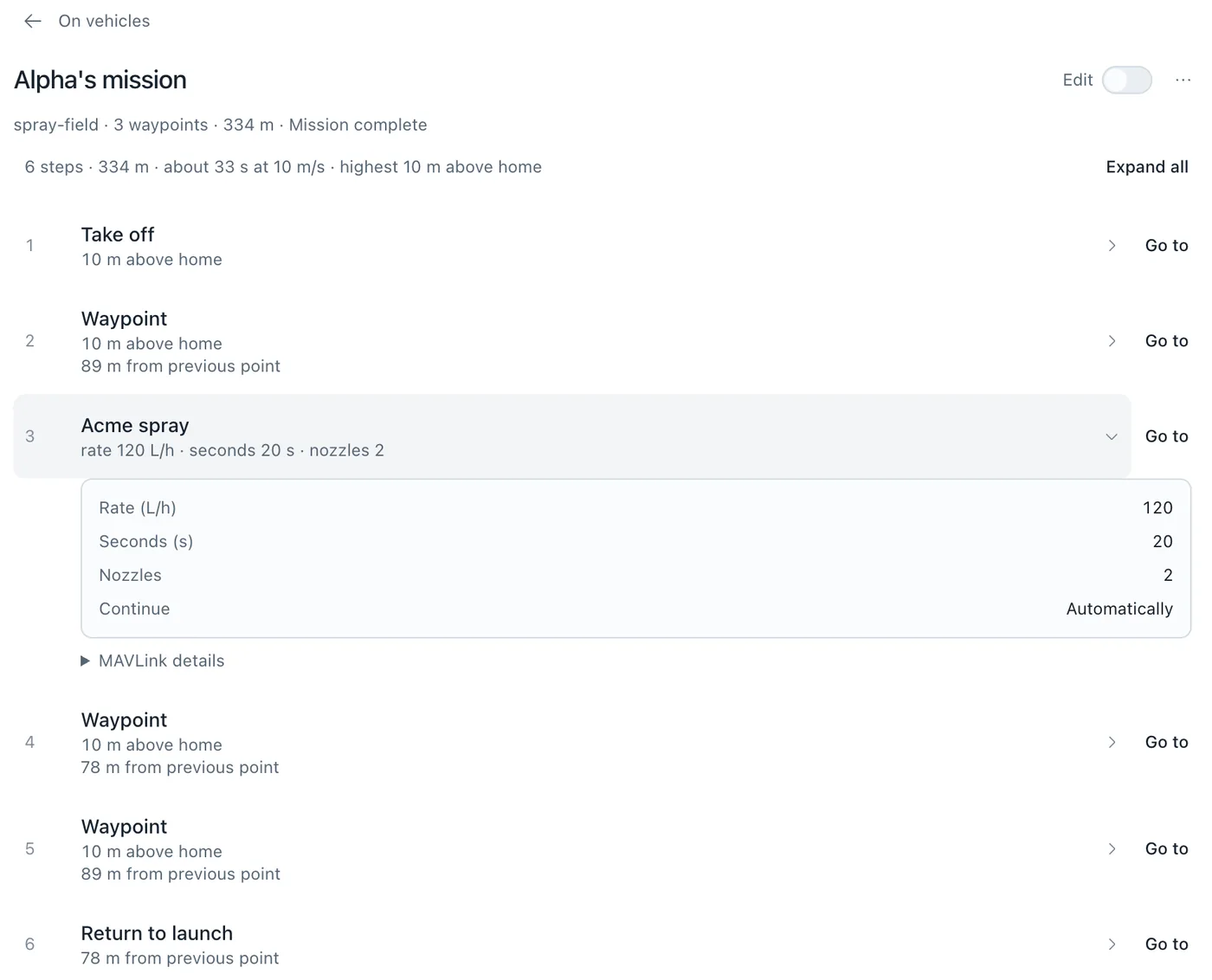
Then it flew. In GUIDED it took off to 10 m and started the mission, and the vehicle sprayed at 120 L/h for 20 s at item 3. The tank in ACME_SPRAY_STATUS went from 10 L to 9.33 L, which is exactly 20 s at that rate.
How do I test my fork in simulation?
Build SITL from the fork and connect UXDuck to it. A SITL reports the commit it was built from, as hardware does, so the fork's dialect and parameter descriptions apply to it by themselves (Your own simulator). The sample above was built and run like this, from the checkout:
./waf configure --board sitl
./waf copter
build/sitl/bin/arducopter --model=+ --instance=2 --home=36.6905,-121.6080,22,90 \
  --serial0=tcp:0:wait --defaults=Tools/autotest/default_params/copter.parm
Instance 2 listens on TCP port 5780. In UXDuck, open Fleet › Links, choose Add link, and add a TCP client link to it:
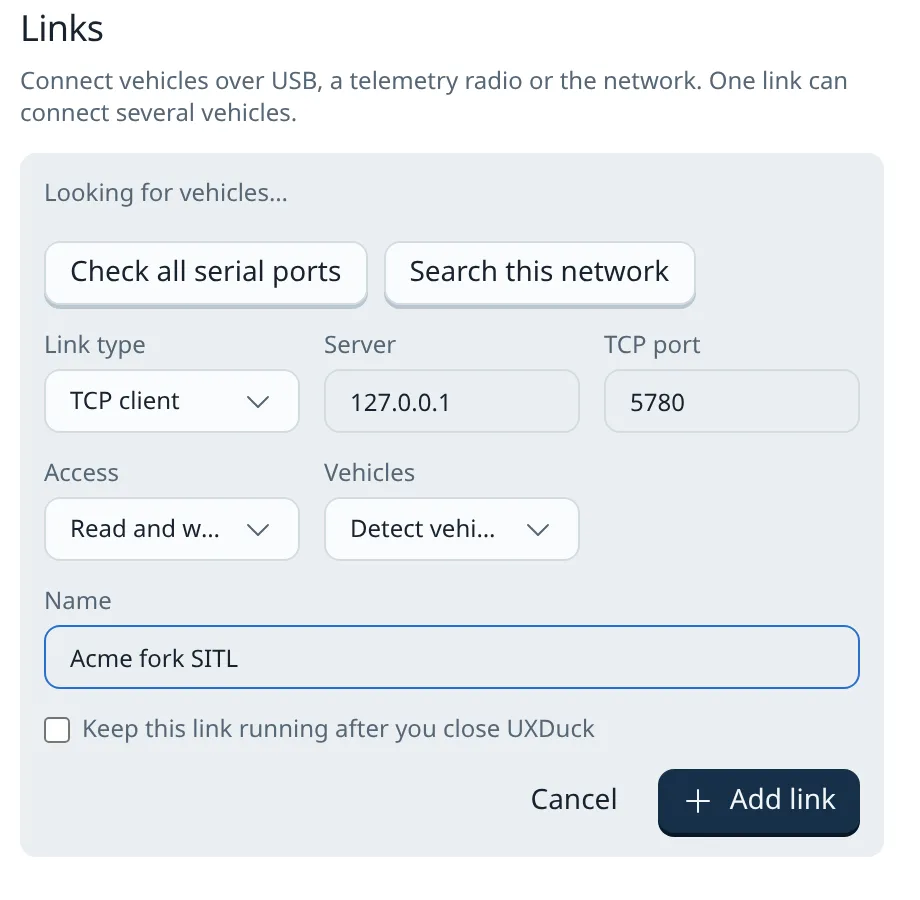
The vehicle appeared with its firmware commit, cb647cee, and everything above applied to it without choosing. If you already run sim_vehicle.py, send its MAVLink to UXDuck with --out=udp:127.0.0.1:15010 instead (Your own simulator).
Can my AI agent read my fork's messages and parameters?
Yes. Connect Claude Code or Codex with uxduck mcp, and the agent's mavlink_inspect tool returns what the inspector shows: ACME_SPRAY_STATUS by name, from the dialect ardupilot cb647cee, with ACME_SPRAY_ON for its state and, in 0.14.0, each field's units.
param_get gives a parameter's value with describedBy, the set its description came from, so the agent can say whether it's reading your fork's description or ArduPilot's (Use with AI agents). Any command or parameter change it asks for waits for your approval.
What doesn't it do yet?
- Commands outside missions. A fork's own commands go to the vehicle as mission items. There's no button or agent tool yet to send one on its own.
- Included files, when you add XML by hand. When you add files in Settings, give the included files too. Generating from a checkout follows its includes.
- PX4 parameter descriptions. Generating descriptions works from an ArduPilot checkout. PX4 support is planned.
Fork problems and where UXDuck covers them
| Problem | What UXDuck does | Version |
|---|---|---|
| Custom messages need a GCS rebuild | Fork's XML added at run time, per commit, decoded in the inspector | 0.13.0 |
| Fields without units | Units from the XML in the inspector and for the agent | 0.14.0 |
| Fork parameters with no descriptions | Descriptions generated from the checkout that built the firmware | 0.13.0 |
| CI builds out of step with the GCS | Firmware profile URL, fetched again daily | 0.13.0 |
| Values the parameter's type can't hold | Refused before sending, with the range | 0.14.0 |
| Custom mission commands missing from the planner | Plans use the vehicle's dialect, with labels and units | 0.13.0 |
| Readback of a command without a place | Verified after upload | 0.14.0 |
| Testing the fork | Your own SITL, matched to its commit | 0.13.0 |
| An agent that can't read custom messages | mavlink_inspect and param_get over uxduck mcp | 0.13.0 |
Try it
- Download UXDuck and connect your fork's vehicle or SITL. The app also runs at app.uxduck.com.
- In Settings › MAVLink messages, add your fork's XML with the commit of each build that has it. Add its parameter descriptions under Parameter descriptions in Settings › Vehicles & connections.
- Open the MAVLink inspector and search for your message.
- Open a plan in Edit, choose the link that uses your vehicle's dialect, such as Use Alpha's dialect, and add your command.
Frequently asked questions
Do I need to rebuild UXDuck to see my custom MAVLink messages?
No. Add your fork's MAVLink XML in Settings › MAVLink messages, or run uxduck mavlink dialects generate on your ArduPilot checkout. UXDuck reads it at run time and decodes the messages for every vehicle built from the commits you give.
How does UXDuck know which vehicle runs my fork?
The vehicle reports the commit its firmware was built from. A dialect or set of parameter descriptions tied to that commit applies to it by itself. You can also choose dialects for one vehicle in its setup's Definitions.
Does adding a dialect change how standard messages decode?
Only for the vehicles using it. UXDuck keeps the messages your fork adds or changes, and a changed standard message applies only to the vehicles on those builds. Every other vehicle decodes standard MAVLink as before.
Can I plan missions with my fork's custom MAV_CMD?
Yes. A plan uses the vehicle's dialect, so the command shows its name, labels and units, and you can edit its parameters. The upload is read back and compared with what was sent.
Which message ids and command numbers can a fork use?
A message id above 255 needs MAVLink 2, and a private dialect can use any range. MAVLink also sets aside MAV_CMD_USER_1 to MAV_CMD_USER_5, 31010 to 31014, for user-defined commands.
Does UXDuck work with PX4 forks?
UXDuck supports ArduPilot today, and PX4 support is planned. Generating parameter descriptions works from an ArduPilot checkout.
Can I keep using Mission Planner or QGroundControl?
Yes. UXDuck works alongside them. A Forward to a program link sends the same MAVLink to Mission Planner or QGroundControl while UXDuck stays connected.